 EN
EN Български
 Čeština
 Dansk
Dansk Deutsch
 Ελληνικά
 Español
 Eesti
Eesti Suomi
Suomi Français
 Gaeilge
 Hrvatski
 Magyar
 Italiano
 Lietuvių
 Latviešu
 Malti
Malti Norsk bokmål
 Nederlands
 Polski
 Português
 Română
 Slovenčina
 Slovenščina
 Srpski
 Svenska
 Türkçe
 Українська
Optional, with your consent
Shieldix Cloud
Connect your sites to Shieldix Cloud. On paid plans, Shieldix AI explains serious incidents and blocks attackers, and a shared list stops addresses that attack several protected sites. One panel shows all your sites.
- Nothing is sent until you connect a site and agree
- Incident data kept for 90 days
- Every answer signed with Ed25519
Shieldix AI
An analyst for the incidents that matter, so you do not have to read firewall logs.
- On paid plans, Shieldix AI looks at serious firewall incidents and explains in plain words, in your account's language, what happened.
- Smaller probes, rate limits and other routine events are sorted by fixed rules.
- When it is sure, Shieldix AI blocks the attacking address on that site for 24 hours. It blocks at most 20 addresses a day per site, and never the address of a server your sites run on, a private address or one on your never-block list.
- Beyond the daily limit, you get a notice instead of a block.
- Shieldix AI itself never receives IP addresses.
- Analyses included in your plan come first, then prepaid AI credits; when both run out, Shieldix AI pauses and the plugin keeps protecting your site.
- Shieldix Cloud emails you about urgent incidents and the ones Shieldix AI leaves to you. The email that Shieldix AI is paused comes at most once every 24 hours.
Shared list of attackers
Addresses that attack several protected sites are blocked on the others too.
An address goes on the shared list of attackers when 3 different accounts report it, or when Shieldix AI rates an attack from it urgent with high confidence. Reports count when they come within 24 hours. Connected sites with a paid plan block a listed address in protect mode, for 24 hours at first. Each time the address comes back, it stays on the list longer, up to 7 days.
Connected sites with a paid plan download the list every 5 minutes.
Private addresses and the addresses of protected sites' servers never go on the list.
One panel for all your sites
Everything Shieldix Cloud knows about your sites, in one place.
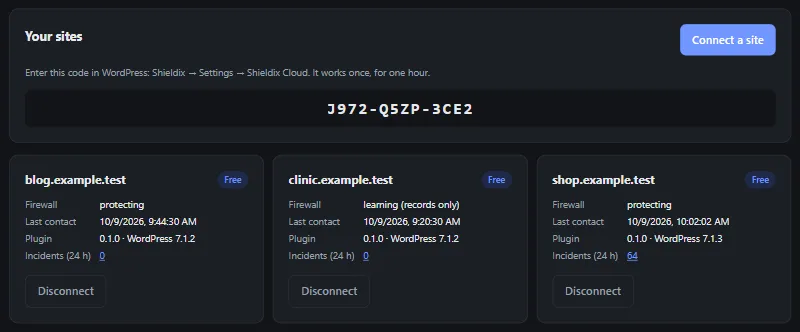
- Connect a site with a one-time code, see its status and disconnect it.
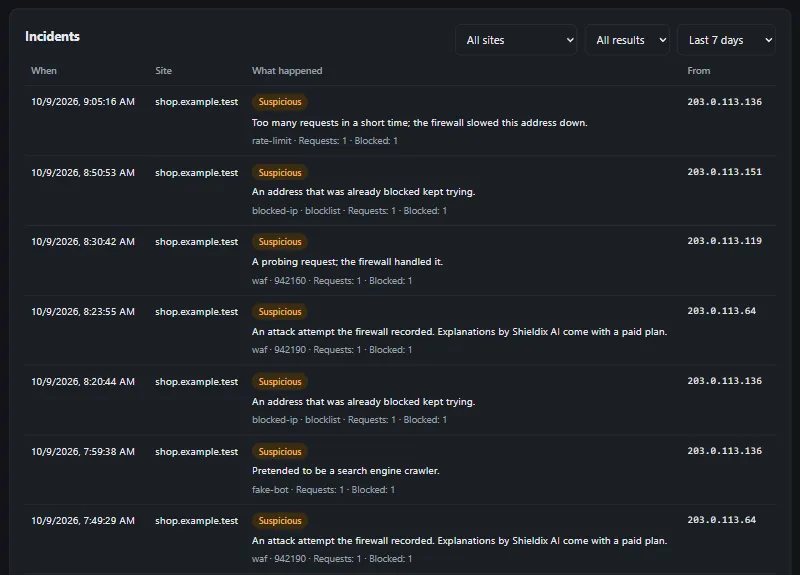
- Incidents of all your sites, with filters and the explanations of Shieldix AI.
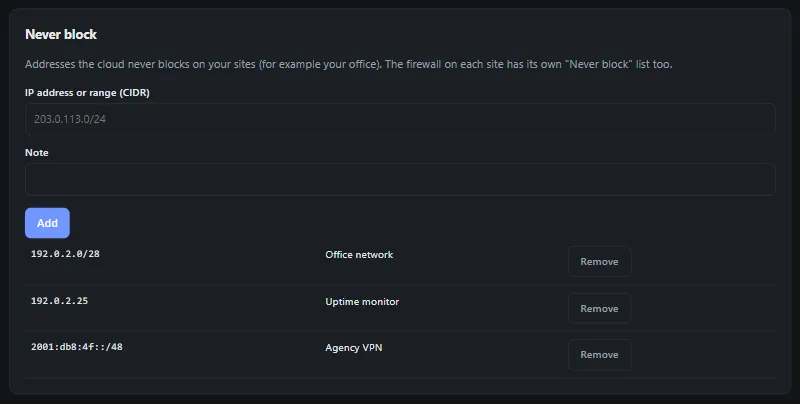
- A never-block list of addresses and ranges; adding an address lifts its Shieldix Cloud blocks at once.
- Your plan and AI credits.
- Two-step sign-in with an authenticator app at every sign-in, and a new code before sensitive changes.
- Export or delete your account at any time.
Your data
Nothing is sent until an administrator connects the site with a code and agrees to what is sent. You can disconnect at any time, from the plugin or from the panel. Shieldix Cloud keeps incident data for 90 days.
Every answer from Shieldix Cloud is signed with Ed25519, and the plugin accepts only answers whose signature checks out. If Shieldix Cloud no longer recognises the site, the plugin disconnects itself and deletes its local Shieldix Cloud data.
What is sent
- Firewall events: the time, the type, the severity and what the firewall did; the rules matched, the descriptions of the rules and the score; how many requests it covers; the request method, the path without its query string, the attacker's IP address and the reference number.
- When you connect: the site's domain and the events of the last 24 hours. After that, new events every 5 minutes.
- Once an hour: the versions of Shieldix, WordPress and PHP, and the firewall mode.
What is never sent
- The query strings of addresses and anything typed into forms.
- Cookies, passwords and the user agents of visitors' browsers.
- Your posts, pages, users and activity log.
- Anything from a site you have not connected.
Protect your WordPress today
Choose a plan for your site and connect it in minutes.