 EN
EN Български
 Čeština
 Dansk
Dansk Deutsch
 Ελληνικά
 Español
 Eesti
Eesti Suomi
Suomi Français
 Gaeilge
 Hrvatski
 Magyar
 Italiano
 Lietuvių
 Latviešu
 Malti
Malti Norsk bokmål
 Nederlands
 Polski
 Português
 Română
 Slovenčina
 Slovenščina
 Srpski
 Svenska
 Türkçe
 Українська
Features
Everything Shieldix does
The Shieldix plugin protects your WordPress site on its own. Shieldix Cloud adds Shieldix AI, the shared list of attackers and one panel for all your sites.
For single WordPress sites with PHP 7.4 or newer; multisite networks are not supported.
Firewall
Checks requests and stops attacks before they reach your site.
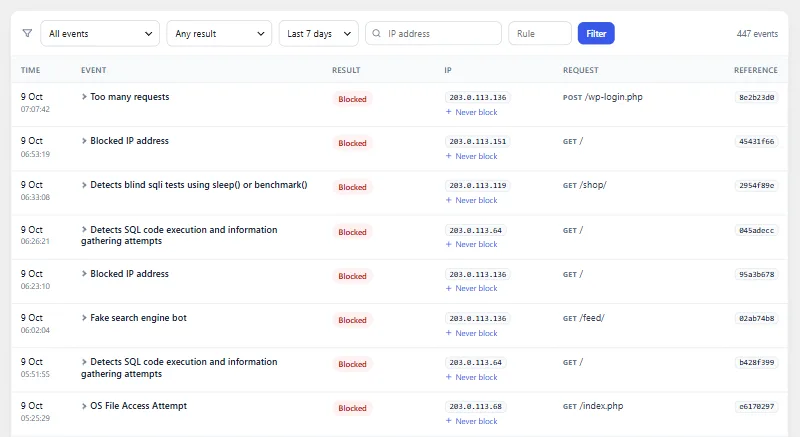
Runs before WordPress
With extended protection on, the firewall checks each request before WordPress and your plugins load; otherwise it starts early as a must-use plugin.
OWASP Core Rule Set
Requests are checked against the OWASP Core Rule Set 4.29 at paranoia level 1, and a request is blocked when the rules it matches add up to the threshold.
Learning mode
For the first 7 days the firewall only records what it would block, so you can review it before blocking starts.
Rate limits
An address that sends more than 240 requests a minute is blocked. The block lasts 10 minutes.
Search, REST and 404 limits
Visitors who are not signed in get lower limits for searches and REST API calls, and repeated requests for pages that do not exist are limited too.
Fake search engine bots
Visitors that call themselves Googlebot or Bingbot but do not come from the address ranges Google and Microsoft publish are blocked.
Countries
When your site is behind Cloudflare, you can block visitors from the countries you choose.
Visitor address source
Choose where the visitor's address comes from: the direct connection, Cloudflare, or X-Real-IP or X-Forwarded-For from trusted proxies.
Editor content
A signed-in request that only matches rules on the values it sends is held until WordPress knows the user: users allowed to post unfiltered HTML pass, so their own content is not blocked, and everyone else is blocked as usual.
Never block
Addresses you add to the never-block list are let through by the firewall on your site.
Kill switch
One line in wp-config.php switches Shieldix off in any mode, even when you cannot reach the dashboard.
Fails open
If the firewall itself runs into an internal error, the request goes through and the error is recorded, so a fault in Shieldix does not take your site down.
Block page with a reference
A blocked visitor sees a short page with a reference number that you can look up in the event log.
Files and vulnerabilities
Finds changed and suspicious files and tells you about known weak spots.
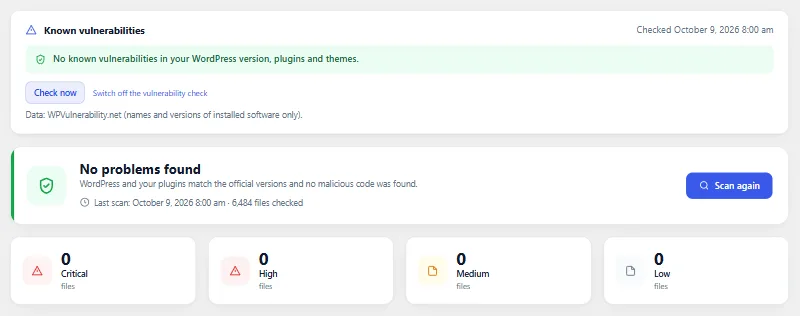
Official checksums
WordPress core and plugins from WordPress.org are compared with their official checksums, so changed and added files stand out.
Web shell signatures
A small set of narrow patterns looks for known web shell and backdoor code.
PHP in uploads
PHP files in the uploads folder, where they do not belong, are reported.
Daily scan
The scan runs once a day in small steps and can be started at any time; a finding you ignore stays quiet until the file changes.
Restore originals
A changed core or plugin file can be replaced with its official copy from WordPress.org, checked against its checksum first.
Quarantine
Suspicious files can be moved to quarantine, then restored or deleted for good; wp-config.php and Shieldix itself are protected from this.
Known vulnerabilities
If you agree, the versions of WordPress, your plugins and themes are checked against the WPVulnerability.net database, and checked again after updates.
Closed plugins
Once a day Shieldix asks WordPress.org whether any of your plugins has been closed there, which means it no longer gets updates from WordPress.org.
Hardening
Closes common ways in. Each measure explains itself and can be turned off again.
One-click hardening
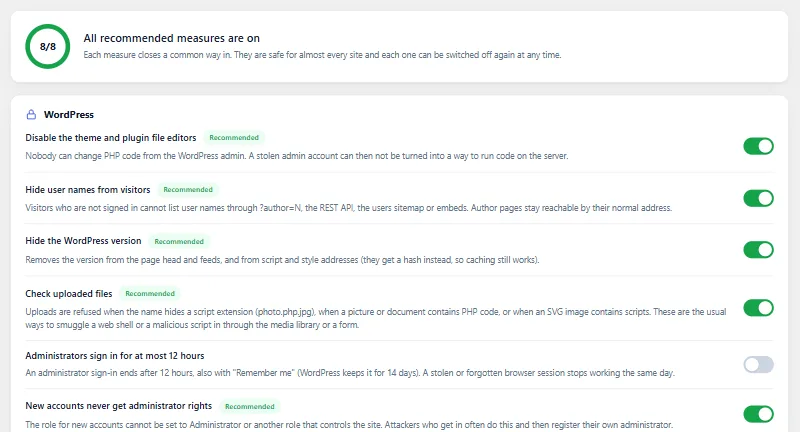
One button turns on the recommended measures, and the hardening tab shows which ones are on.
File editors
Turns off the theme and plugin file editors in the dashboard.
XML-RPC
Turn XML-RPC off, or keep it on and refuse system.multicall, which packs many calls into one request.
User enumeration
Visitors who are not signed in cannot list usernames through author addresses, the REST API, the users sitemap or embeds.
Hidden WordPress version
The WordPress version is left out of the page source and file addresses.
Application passwords
Allow application passwords for everyone, only for administrators, or for nobody.
Safe role for new accounts
The role given to new accounts cannot be one with administrator-level powers, even when the setting is changed directly in the database.
Upload checks
An upload is refused when its name hides a script extension, when PHP code is found in a file that should not have any, or when an SVG image contains scripts.
Security headers
Adds X-Content-Type-Options, X-Frame-Options, Referrer-Policy, Permissions-Policy and Cross-Origin-Opener-Policy, with HSTS as a separate choice.
Server file rules with automatic rollback
On Apache, .htaccess rules protect files such as wp-config.php, turn off folder listings and stop PHP in uploads; if the site stops answering, they are rolled back. On nginx you get the matching rules to copy.
Two-step sign-in with the official plugin
Shieldix does not add its own two-step sign-in to WordPress: it helps you install the official Two Factor plugin and shows which administrators have not set it up.
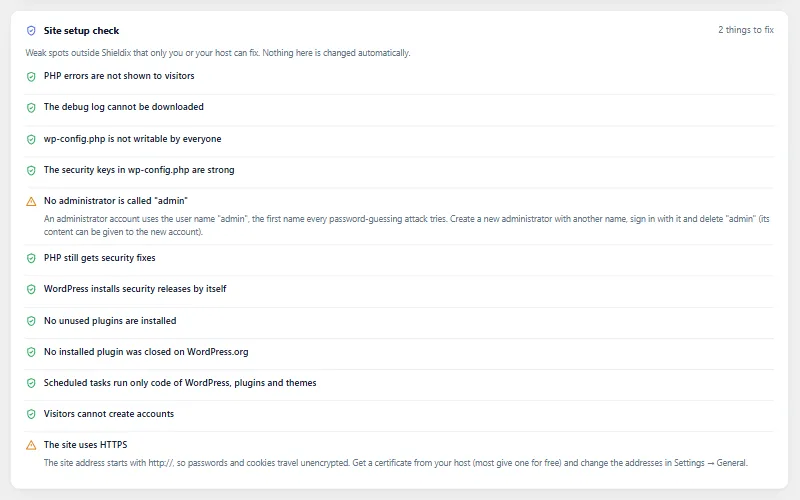
Site setup check
A read-only check for debug output shown to visitors, a public debug.log, wp-config.php permissions, weak keys, a user called admin, an old PHP version, auto-updates turned off, inactive plugins, open registration and HTTPS.
Respond and watch
Act fast when something is wrong and see what changes behind the scenes.
Emergency lockdown
One button signs everyone out, revokes application passwords, replaces the WordPress security keys and gives the other administrators a new random password with a reset link.
Administrator sessions
See where administrators are signed in, end a session, and if you like, limit administrator sign-ins to 12 hours.
Outgoing connections
Records the outside servers that WordPress, plugins and themes contact through WordPress's HTTP functions, shows which one made each call, and can email you when a new server appears.
Hidden code watch
Every hour, drop-ins, must-use plugins and the firewall loader are checked for changes, and a missing or changed Shieldix loader is put back.
Scheduled tasks
Every hour, scheduled tasks are traced to the file that runs them, and tasks whose code comes from uploads, from eval or from outside WordPress are flagged.
Activity log
Keeps 30 days of sign-ins, failed sign-ins and changes to plugins, themes, users, roles, passwords, email addresses and key settings.
Stay informed
Know what happened without opening the dashboard every day.
Overview
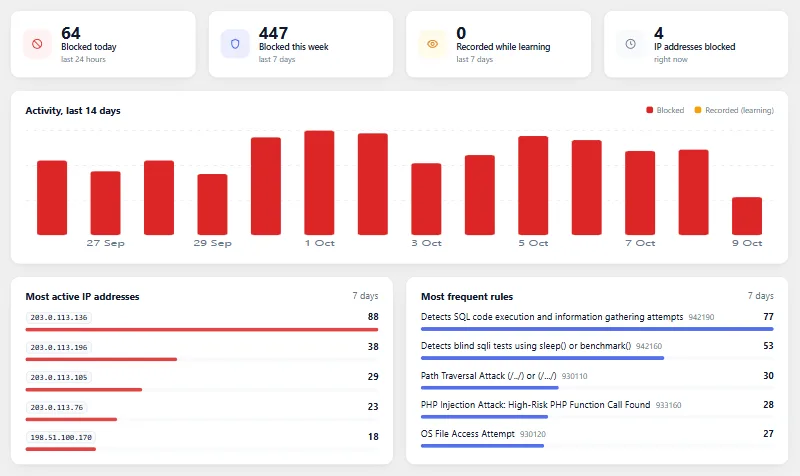
The Shieldix overview shows counts for the last 24 hours and 7 days, a chart of the last 14 days, the top addresses and rules, and the active blocks with an Unblock button.
Event log
Blocked and recorded requests with their rule and address, with filters and details, kept for 30 days.
Email alerts
Emails about attacks above a threshold, firewall errors, the end of learning mode, new administrators, administrator sign-ins from a new address, a new application password, important setting changes, scan findings and known vulnerabilities, when Shieldix is deactivated or a privileged role for new accounts is refused, and about a new outside server (off by default), at most 10 emails an hour.
Weekly report
One short email a week: what the firewall blocked, what still needs attention and which updates are waiting.
Site Health
Checks for the firewall, file scan, known vulnerabilities and hardening appear on the Site Health screen of WordPress, each with a link to where it is fixed.
Dashboard widget
A short summary on the WordPress dashboard with these checks and the number of blocked attacks.
For developers and agencies
Work from the command line and move settings between sites.
WP-CLI
Check the status, change the mode, unblock or allow addresses, scan, run the emergency lockdown, import and export settings and connect Shieldix Cloud from the command line.
Import and export
Move your Shieldix settings to another site as one file.
Privacy tools
A suggested text for your privacy policy, plus support for the personal data export and erase tools of WordPress.
28 languages
The plugin is available in English and 27 other languages.
Shieldix Cloud
Connect your sites to Shieldix Cloud, only with an administrator's consent.
Shieldix AI
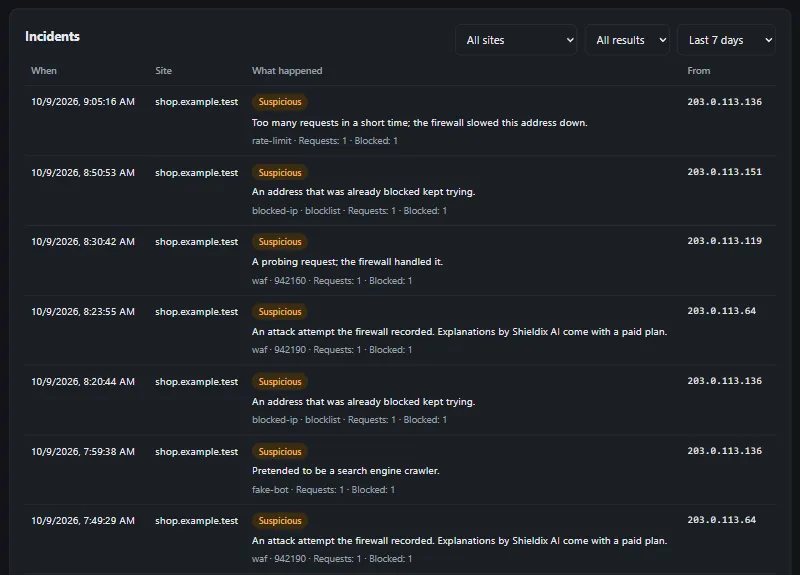
On paid plans, Shieldix AI looks at serious firewall incidents and explains in plain words, in your account's language, what happened.
Automatic blocks
When it is sure, Shieldix AI blocks the attacking address on that site for 24 hours. It blocks at most 20 addresses a day per site, and never the address of a server your sites run on, a private address or one on your never-block list.
Shared list of attackers
An address goes on the shared list of attackers when 3 different accounts report it, or when Shieldix AI rates an attack from it urgent with high confidence. Reports count when they come within 24 hours. Connected sites with a paid plan block a listed address in protect mode, for 24 hours at first. Each time the address comes back, it stays on the list longer, up to 7 days.
One panel for all sites
Your sites, incidents and explanations, the never-block list, your plan and AI credits in one place.
Two-step sign-in
The Shieldix Cloud panel asks for a code from an authenticator app at every sign-in, and again before sensitive changes.
AI credits
Analyses included in your plan come first, then prepaid AI credits; when both run out, Shieldix AI pauses and the plugin keeps protecting your site.
Cloud emails
Shieldix Cloud emails you about urgent incidents and the ones Shieldix AI leaves to you. The email that Shieldix AI is paused comes at most once every 24 hours.
Signed answers
Every answer from Shieldix Cloud is signed with Ed25519, and the plugin accepts only answers whose signature checks out.
Automatic disconnect
If Shieldix Cloud no longer recognises the site, the plugin disconnects itself and deletes its local Shieldix Cloud data.
Data you control
Nothing is sent until an administrator connects the site and agrees; you can disconnect at any time, and export or delete your account from the panel.
Protect your WordPress today
Choose a plan for your site and connect it in minutes.